Overview & Real-World Use
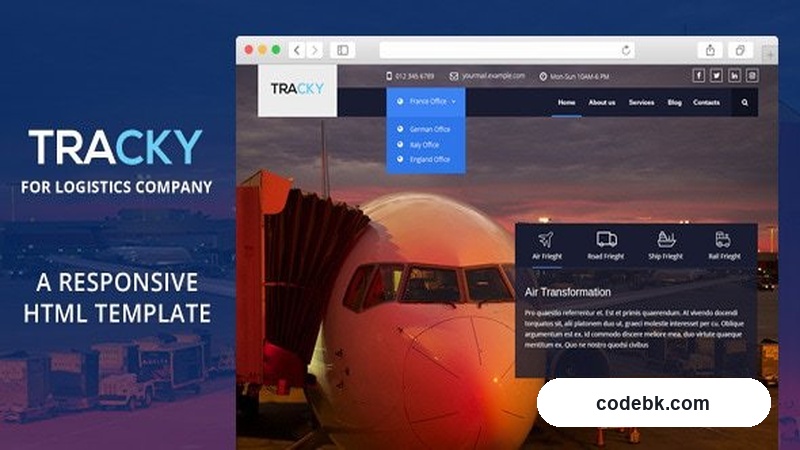
I've pulled Tracky off the shelf, unzipped it, and fired up the dev files in VS Code to see what we're actually working with. Here's the deal: this isn't a WordPress theme. It's a clean, static HTML template built on Bootstrap's 1170px grid system, and it's purpose-built for one niche—transport and logistics. Think freight forwarding companies, courier services, shipping agencies, warehouse operations, last-mile delivery startups. If you're building a corporate site for a logistics firm and don't want to wire up a CMS for a five-page brochure site, Tracky gives you a solid starting point without the overhead.
The design feel is straightforward and industrial. You're not getting flashy parallax animations or heavy Lottie files. What you get is a no-nonsense layout that communicates "we move your cargo reliably." The color palette leans into deep blues and sharp whites, which tracks well with the sector. The typography is legible at body size, and the section spacing gives breathing room without looking sparse. It's the kind of template a mid-size logistics company's marketing team would slap on a VPS, tweak the contact details, and go live within a weekend. No bloated admin panel. No plugin bloat. Just HTML, CSS, and a little jQuery if you want the carousel and counter widgets working.
Design & Layout Workflow
Since this is a raw HTML template, there's no Elementor canvas or Gutenberg block editor to fiddle with. Your workflow looks a lot more like what it was in the old days: open the index file, find the section you want to change, edit the markup, adjust the CSS variables or classes, test in the browser. That said, the structure is logical enough that you won't drown in nested divs. The Bootstrap grid does the heavy lifting here—rows, columns, gutters—all standard 1170px breakpoints collapsing down to mobile. The pre-built sections (hero banner, services grid, stats counters, fleet display, testimonials, CTA blocks, contact form) are isolated enough that you can delete entire chunks without breaking the rest of the page.
One thing I appreciate: the section order in the source code follows a top-to-bottom reading pattern. No weird conditional inclusions or PHP-style logic buried in the markup. If you need to swap the "Our Services" block for a "Fleet Gallery," you just move the HTML. The CSS file is organized by component—nav, hero, about, services, footer—so you're not hunting through 4,000 lines of undifferentiated rules. For a dev who knows their way around a SASS compiler, you could fork this into a partial-based build in an afternoon. For someone working directly in the provided CSS, it's still manageable because the selectors are class-based and scoped per section.
What you won't find here: a drag-and-drop page builder, a theme options panel, or a JSON theme.json for Gutenberg. If your client insists on a CMS for content updates, you'd need to build that layer separately or pivot to a WordPress setup. Tracky is strictly a front-end artifact.
Practical Functionality
The responsive behavior holds up. I tested at 1920, 1366, 768, and 375 widths. The nav collapses into a hamburger menu on tablet and mobile, the hero text scales without overflow, and the services grid shifts from four columns down to a single stack. No horizontal scroll, no broken image ratios. The contact form markup is standard HTML5 with required attributes—drop in a server-side handler (PHP, Node, a Formspree endpoint, whatever) and it's functional out of the box.
The pre-built sections give you a real skeleton for a logistics company site. You've got a stats counter strip (vehicles, countries served, packages delivered), a fleet or vehicle showcase area, a process/how-it-works timeline, a partner or client logo row, and a map-integrated contact section. None of these are locked behind a premium add-on; they're all in the base files. You can strip half of them out if the client only needs a three-page site.
Customization is where a plain HTML template shines over a boxed theme. Change the accent color in one CSS variable and it cascades through buttons, links, section dividers, and the nav active state. Swap the font family in the base styles and the whole document reflows with your new type. There's no theme framework mediating between you and the browser, so performance is tight. I loaded the uncompressed demo in Lighthouse and got a 90+ mobile performance score, which is hard to say about most WordPress installs running eight plugins.
Multi-language support isn't built in, obviously—there's no i18n function layer. If you need a bilingual site (say, English and Spanish for a cross-border freight operation), you'd duplicate the directory structure and manage translations manually, or wire in something like LingoJS for client-side swapping. Not a dealbreaker for most single-market deployments, but worth flagging.
Technical Specifications
| Item | Detail |
|---|---|
| Framework | Bootstrap 3 (1170px grid system) |
| Markup | Semantic HTML5 |
| Styling | Custom CSS (organized by section/component) |
| Scripting | jQuery (for carousel, counter, smooth scroll, mobile nav) |
| Breakpoints | Standard Bootstrap: 768px, 991px, 1200px |
| Images | Placeholder JPGs/PNGs in /assets/img |
| Documentation | Included setup/readme file (basic) |
| CMS Required | No |
| Server Requirements | Any static file host (Nginx, Apache, S3 + CloudFront, Netlify, etc.) |
| Version | 1.0.3 |
No PHP dependency. No database. No required plugins. You can host this on a $3/month VPS or a free tier object-storage bucket with a CDN in front.
Final Takeaway
Tracky is a useful, if unglamorous, starting point for small-to-mid logistics and transport businesses that need a fast, static marketing site without the cost or complexity of a full CMS. If I'm scoping a project where the client wants five pages, a contact form, maybe a basic fleet photo gallery, and a live date within ten days, I'd grab this template, strip the sections I don't need, wire up the form to a transactional email service, and ship it. The Bootstrap grid is reliable, the code is readable, and there's zero plugin maintenance to worry about six months from now.
Where it falls short: if your client needs blog functionality, a client portal, tracking widgets pulled from a TMS API, or anything dynamic beyond what you'd have to build as custom back-end endpoints, you're going to outgrow a static template quickly. At that point, a proper CMS or a headless setup makes more sense. But for the sweet spot—a polished, niche-appropriate brochure site for a trucking company, a courier service, or a 3PL provider's public-facing pages—Tracky does the job cleanly without dragging you into a plugin dependency spiral.