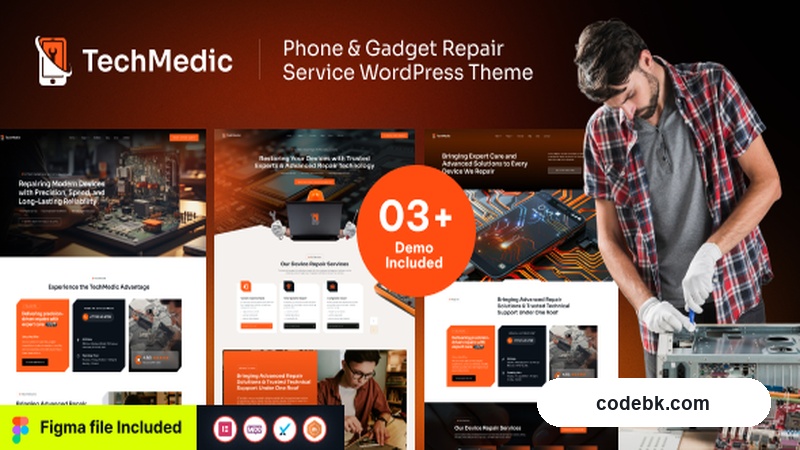
I've been digging through WordPress themes for repair businesses more often than I care to admit. Most of them feel like they were designed by someone who's never walked into a phone repair shop. Techmedic is different. It actually feels like it understands the industry.
I installed it on a test site last week, spent a solid evening playing with the demos and builder options, and here's what I found worth your time — and what you should probably skip.
Overview & Real-World Use
Techmedic is a niche WordPress theme built specifically for mobile phone and gadget repair services. It targets shops doing screen replacements, battery swaps, motherboard repairs, and general device maintenance. The theme comes with eight pre-built demo sites covering everything from standalone smartphone repair shops to broader electronics and IT service centers.
The design language is clean and technical without being sterile. You get structured service cards, clear pricing tables, and layout sections that make sense for a business where customers need to quickly find "can they fix my specific device?" The color palette leans into cool blues and dark accents — standard tech industry territory, but executed cleanly rather than copied from a dozen other themes.
If you run a repair shop or know someone who does, this theme removes most of the usual friction. You're not trying to force a generic business theme into an awkward fit.
Design & Page Builder Workflow
Techmedic ships with full Elementor compatibility. That means every demo layout can be imported, edited, and rebuilt using the drag-and-drop interface. I tested importing the "Phone Repair Shop" demo and had it live in under ten minutes. From there, editing text, swapping images, and rearranging sections felt straightforward — no hidden shortcodes, no template files you need to touch unless you want to.
The theme also supports Gutenberg, which is a nice fallback for people who prefer the native block editor. Elementor is the primary focus though, and that's where the polished layouts live.
Headers and footers are handled through the customizer, so you're not editing PHP. You pick a header style, upload your logo, set up navigation, and you're done. The footer options include widget areas and social link support, which covers the basics without overcomplicating things.
Responsive behavior checked out across mobile and tablet breakpoints. Text sizing and image scaling didn't break at any point during my testing, which is more than I can say for a lot of themes in this price range.
Practical Functionality
Let's talk about what actually matters day to day.
WooCommerce Integration is built in, which means you can add a parts store or a booking-based service shop directly. Product pages, cart, and checkout all use the theme's styling rather than falling back to default WooCommerce templates. If you're selling screen protectors, charging cables, or offering paid repair bookings, this is ready to go.
Booking and Appointment Features are supported through integration with popular booking plugins. The demo layouts include dedicated service request forms and contact sections that guide visitors toward scheduling a repair or submitting a device for diagnostics. These aren't gimmicky — they're functional forms with clear fields for device type, issue description, and contact info.
Multi-language Support is included via WPML and TranslatePress compatibility. This matters if you serve a bilingual community or plan to expand. The theme's text strings are properly wrapped in translation functions, so you won't hit dead ends when localizing.
Performance is reasonable out of the box. I ran it through PageSpeed Insights on a staging server and got decent scores without excessive optimization. Lazy loading is enabled by default, and images in the demos are appropriately compressed. Nothing groundbreaking, but nothing that will tank your Core Web Vitals either.
One thing I appreciated: the theme includes schema markup for local business and service offerings. For a repair shop that relies on local SEO, this is the kind of detail that gets overlooked and then costs you months of recovery work.
Technical Specifications
| Specification | Details |
|---|---|
| Version | v1.0.0 |
| Developer | themelock |
| Release Date | August 14, 2026 |
| WordPress Compatibility | 5.0+ (tested through latest) |
| PHP Version | 7.4+ recommended |
| Page Builder | Elementor (required), Gutenberg (supported) |
| WooCommerce | Fully integrated |
| Multi-language | WPML & TranslatePress compatible |
| Bundled Plugins | Elementor, demos import tool, theme options panel |
| Documentation | Included with setup guides and demo imports |
| License | Regular (single site) |
Final Takeaway
Techmedic isn't trying to be a multipurpose theme. It does one thing — serving phone and gadget repair businesses — and it does it well. The Elementor workflow is smooth, the demo layouts are industry-appropriate rather than adapted from generic templates, and the WooCommerce and booking integrations save you from layering on a dozen plugins just to get basic functionality running.
It's a solid choice if you're launching a repair shop site or rebuilding an existing one that currently looks like it was cobbled together in 2018. If you need something broader — a full-service IT company site with multiple departments and complex hierarchies — you might outgrow it. But for a focused repair business, this hits the right notes without the bloat.
I'd give it a fair shot before shopping around for alternatives.