Overview & Real-World Use
I've been running through Scape v1.5.17 for a couple of weeks now, installing it on a few test builds before deciding whether to recommend it. Here's the honest picture: it's one of those themes that tells you it does everything, and surprisingly, it actually does most of it well.
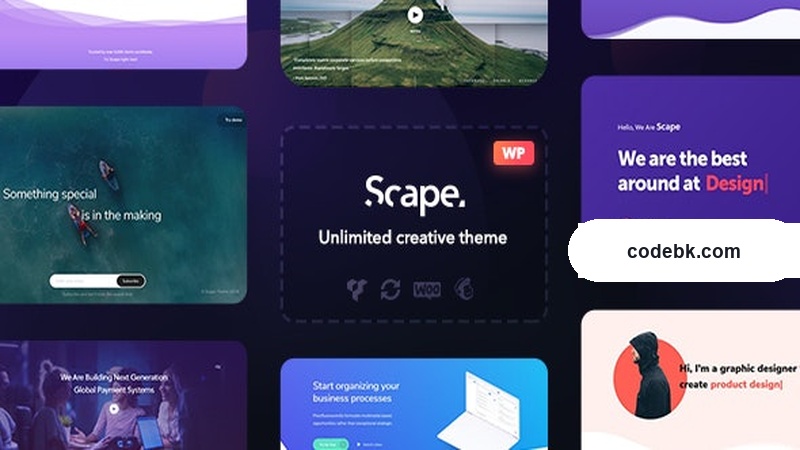
Scape is built for agencies, freelancers, and publishers who need a flexible foundation they can drop into pretty much any project — corporate site, portfolio, blog, WooCommerce shop, you name it. It ships with over 30 pre-built demo sites covering niches like fitness, law firms, real estate, SaaS, restaurants, and more. You're not starting from blank canvas every time, which saves a lot of time.
What caught my attention right away is the design sensibility. The default layouts feel modern without trying too hard — clean typography, generous whitespace, and a color system that's easy to override. If you've ever fought a multipurpose theme that looked generic no matter what you changed, Scape is a relief on that front.
Design & Page Builder Workflow
At the heart of Scape is WPBakery Page Builder. That means drag-and-drop frontend editing, shortcodes for every element, and a visual composer-style backend editor that most developers find comfortable. If you've used Visual Composer in the past, the learning curve here is basically zero.
The Live Frontend Editor is where Scape separates itself from older multipurpose themes. Instead of opening a separate backend panel to tweak a section, you click directly on elements on the page and edit them in place — colors, fonts, spacing, content, all in real time. It cuts out the back-and-forth that normally slows down client revisions.
Beyond the builder itself, Scape gives you:
- Header Builder — Drag and drop your own header layouts. Mix logos, navigation, call-to-action buttons, and social icons however you want. No more picking from a dropdown menu of predefined headers and hoping one fits.
- Footer Builder — Same treatment on the bottom. Multiple footer columns, widgets, copyright bars, you build it.
- Demo Import — One-click import brings in a full demo site with content, images, and layout. You can then strip it down or rebuild it from there.
- Custom Post Types & Taxonomies — Built-in support for portfolios, team members, testimonials, and sliders without needing extra plugins.
If you prefer Gutenberg, Scape also plays nice with the block editor for simpler pages. But honestly, this theme was clearly designed to shine with WPBakery. That's where the real power lives.
Practical Functionality
Let me talk about what matters once the theme is actually running on a live site.
WooCommerce Integration
Scape comes with WooCommerce-ready templates for product archives, single product pages, cart, and checkout. The product grid supports multiple column layouts, hover effects, and quick-view modals. It's not the most flashy shop theme out there, but it's functional and professional — exactly what a B2B brand or small catalog owner needs without drowning in settings.
Header & Footer Control
This is where the header builder earns its keep. I spent about ten minutes rebuilding the header on one of the demos to match a client's branding. No coding, just drag, drop, customize colors and fonts, save. The same goes for footers. Having full control over both without touching PHP is genuinely convenient.
Responsive Performance
I tested Scape on mobile, tablet, and desktop breakpoints. Navigation collapses cleanly into a hamburger menu, images scale properly, and text remains readable without zooming. Some multipurpose themes wreck mobile layouts with overly complex elements — Scape keeps things simple enough that it doesn't.
Multi-Language & RTL
The theme supports WPML and Polylang for multi-language sites, and RTL direction is built in. If you're building for Middle Eastern or Spanish-speaking audiences, those features work out of the box. No extra configuration required.
Theme Options Panel
Scape includes an extensive options panel where you can set global colors, typography, layout widths, sidebar positions, and more. Changes here cascade across the entire site, so you're not hunting through individual pages to adjust a heading font size.
Blog & Magazine Layouts
For publishers, the blog section offers multiple archive styles — grid, masonry, list, with or without sidebars. Individual post layouts support featured images, author boxes, related posts, and social share buttons. It's a solid foundation for a content-driven site.
Technical Specifications
| Specification | Details |
|---|---|
| Version | v1.5.17 |
| WordPress Compatibility | 6.x+ |
| PHP Version | 7.4+ recommended |
| Page Builder | WPBakery Page Builder (bundled) |
| WooCommerce | Yes, built-in templates |
| Multi-Language | WPML & Polylang compatible |
| RTL Support | Yes |
| Demn Included | 30+ pre-built demo sites |
| Header Builder | Visual drag-and-drop builder |
| Footer Builder | Visual drag-and-drop builder |
| Documentation | Detailed online docs included |
| Update Frequency | Regular updates |
| License | Regular WordPress theme license |
Final Takeaway
Scape v1.5.17 is a solid, well-rounded multipurpose theme that hits the right balance between flexibility and ease of use. The WPBakery integration is reliable, the live frontend editor speeds up workflow, and the header/footer builders are genuinely useful features that some premium themes still charge extra for.
It won't win design awards for originality — it's built for practicality, not flash. If you're a developer or agency owner looking for a theme you can spin up quickly and customize without writing custom code, Scape is a strong choice. It's especially worthwhile if you already know WPBakery and want to avoid switching to Gutenberg or Elementor for client projects.
Who should grab this: Freelancers, web agencies, and content publishers who need a dependable multipurpose theme with strong builder support and ready-made demos. Not ideal if you're chasing cutting-edge block editor workflows or ultra-minimalist design — in those cases, look elsewhere.