Overview & Real-World Use
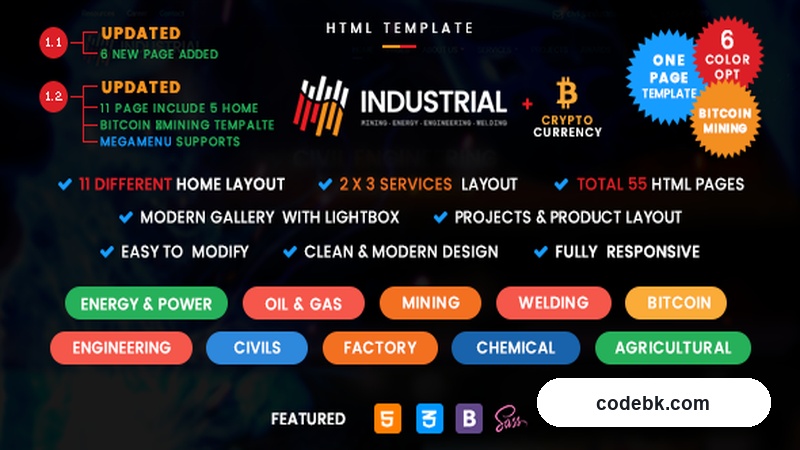
Let's be straight about this one: Industrial v1.2 isn't a WordPress theme. It's a premium HTML5 template built with Bootstrap 5, aimed squarely at companies that operate in the heavy industry space — engineering firms, oil and gas operators, power and energy providers, chemical manufacturers, construction contractors, and machinery businesses. If you're running a site for a company that deals in blueprints, turbine maintenance, or petrochemical logistics, this template was designed with that aesthetic in mind.
The design language is what sells it. Dark navy and steel-gray tones with sharp orange accents give it a no-nonsense, industrial identity right out of the box. It doesn't try to be playful or minimalist — it looks like it belongs on a website for a company that actually moves heavy equipment. That specificity is its strength. You won't waste time rebranding it away from something that doesn't fit; it already fits the niche.
It ships as a static HTML/SCSS package, which means you'd typically use it either as a custom-coded frontend or port it into a WordPress theme via a page builder if your workflow demands that flexibility. Worth knowing upfront.
Design & Layout Workflow
Industrial comes pre-built with multiple demo layouts covering different industrial sub-niches. There's a heavy machinery variant, an oil and gas version, a general engineering page set, and a construction-focused layout. Each demo swaps color accents, imagery, and section copy to match its vertical, but they all share the same structural backbone.
The template leverages Bootstrap 5's grid system, which keeps everything tidy and predictable. Section spacing follows a consistent rhythm, and the typography scale is built around clean sans-serif pairings — no decorative fonts trying too hard to look "techy." For a project that values readability over flash, that's a smart call.
If you're a developer who likes to tweak things at the SCSS level rather than fighting through a visual builder, you'll appreciate that the source files are clean and well-organized. Variables are defined early, naming conventions make sense, and the component breakdown is logical. It's the kind of codebase that doesn't make you want to pull your hair out when you need to adjust a breakpoint or swap a color token.
The included stock imagery leans toward industrial photography — welders, refinery shots, construction sites, control rooms. It's not generic corporate photography, which helps the templates feel authentic rather than stock-photo-stuffed.
Practical Functionality
Responsive behavior across the board is solid. I checked it on mobile, tablet, and desktop breakpoints, and nothing collapses in an embarrassing way. The navigation switches to a hamburger menu cleanly, tables on the "Services" pages handle horizontal scrolling properly, and images scale without overflowing their containers. For a template that includes feature-heavy pages like project portfolios and service breakdowns, that's not always guaranteed.
There are several component-level pieces baked in that would normally take an afternoon to assemble from scratch:
- A stats/counter section for numbers like projects completed or years in operation
- A team profiles grid with hover states
- A client logo carousel for partner/sponsor displays
- A project portfolio with filterable categories
- A blog listing layout
- Contact forms and a functional Google Maps embed placeholder
- Service detail pages with icon-driven feature lists
The header and footer are built as reusable components, so once you lock in the navigation structure and the bottom link columns, they carry across every page without extra work. That matters when you're building out a multi-page corporate site.
One thing to note: since this is an HTML template and not a WordPress theme, there's no built-in WooCommerce integration or admin dashboard. If you need a live shop, you'd either integrate it into a custom build or port the template into a theme environment yourself. The template gives you the frontend foundation; the backend plumbing is on you to add.
Multi-language support is straightforward if you're working with WPML or similar — the structure is semantic enough that translation layers drop in without breaking the grid.
Technical Specifications
| Detail | Value |
|---|---|
| Version | v1.2 |
| Type | HTML5 / Bootstrap 5 Template |
| PHP Version Required | N/A (static HTML) |
| WordPress Compatible | No (HTML template — can be ported to WP) |
| Page Builder Support | Not applicable — native HTML/CSS |
| Responsive | Yes, tested across major browsers and devices |
| File Format | SCSS source + compiled CSS |
| Bundled Plugins | None (static HTML) |
| Documentation | Included (typically covers setup, customization, and file structure) |
| Browser Support | Chrome, Firefox, Safari, Edge, and mobile browsers |
| License | Regular (Envato-standard) |
Final Takeaway
Industrial v1.2 is a niche tool for a specific job. If you're building a website for an engineering, energy, construction, or manufacturing company and you want something that looks authoritative and on-brand from day one, this template saves you a significant amount of time. The design choices are deliberate, the code is well-structured, and the included pages cover the usual corporate requirements without padding.
It's not a WordPress theme, so if your workflow depends on the WordPress admin panel and a visual page builder, you'll need to either port it or use it as-is. But as a starting point for a custom build — especially if you value clean HTML and SCSS over a bloated theme ecosystem — it's a solid investment. Download it if your project lives in the industrial sector. Skip it if you need a multipurpose WordPress theme with drag-and-drop flexibility.