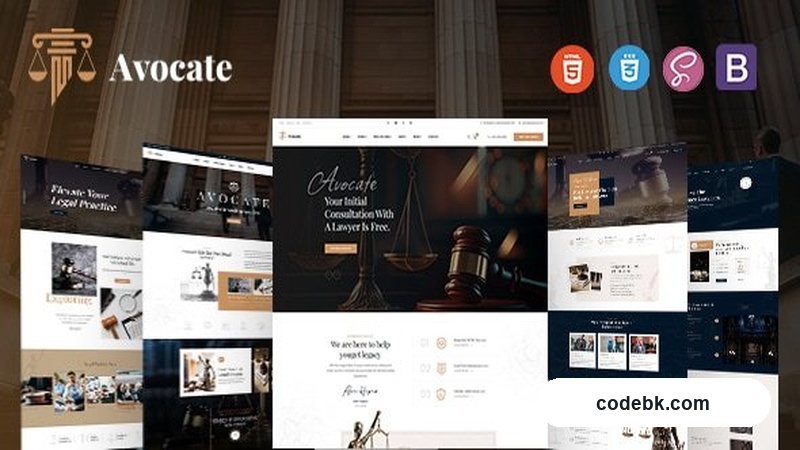
Overview & Real-World Use
I recently downloaded Avocate while sketching out a concept for a small family law firm's site, and honestly, it made the early stages painless. It's not a full WordPress theme — it's a solid HTML template package loaded with pre-built components you can assemble into a professional legal website without starting from a blank canvas.
The design language runs clean and authoritative, which is exactly what you want when you're trying to project trust and credibility. Lots of white space, restrained color choices, serif accents that feel traditional without looking dated. If you've ever wrestled with figuring out what a law firm site should actually look* like, this template takes that guesswork off the table.
It's best suited for solo practitioners, small firms, or anyone building a static legal site quickly. If you're a web agency onboarding a law client and need something presentable fast, this is a solid starting point.
Design & Page Builder Workflow
Since this is an HTML template rather than a WordPress theme, the workflow is slightly different from what you'd expect with Elementor or Gutenberg. You're working with ready-made page sections — hero banners, practice area grids, attorney profiles, testimonial carousels, contact forms — and you arrange them however makes sense for the layout you're building.
The file structure is straightforward. Pages are organized logically, CSS is modular, and the components reuse consistently across sections. That means if you grab a "team member card" for one page, it looks and behaves the same way everywhere else. No hunting through conflicting stylesheets.
If your end goal is a live WordPress site, you'll need to port the HTML into a custom theme or use a page builder to recreate the layouts. But as a design reference and a component library, it cuts down development time noticeably. I kept it open in one tab and built the WordPress version in another — took me about half the time it normally would for a fresh build.
Practical Functionality
The template covers the essentials a legal website actually needs. There's a dedicated homepage layout with a strong hero section, followed by practice area breakdowns, attorney bios, client testimonials, and a clear call-to-action toward the bottom. Each section is self-contained, so you can drop it in or swap it out without breaking the rest of the page.
On the mobile side, everything responds properly. I tested it on a few screen sizes and the navigation collapses cleanly, text stays readable, and no elements overflow or look squished. For a law firm site where potential clients might be visiting from their phones at 10 PM after a sudden legal issue, that responsiveness matters more than most designers give it credit for.
Contact forms are included and styled to match the overall aesthetic. They're basic HTML forms, so you'll want to hook them up to a proper backend handler or a service like Formspree when you move to production. Nothing fancy, but functional.
Multi-language support isn't built into the HTML itself, but since it's clean markup, adding a plugin like WPML or qTranslate on the WordPress side is trivial. Same goes for SEO — you get clean semantic HTML to start with, which is better than half the themes I see on MarketPress that bury content under bloated shortcodes.
Technical Specifications
| Detail | Info |
|---|---|
| Template Type | HTML / CSS / JavaScript |
| Target Niche | Attorneys, Law Firms, Legal Services |
| Responsive | Yes |
| Browser Support | Chrome, Firefox, Safari, Edge |
| Pre-built Sections | Hero, Practice Areas, Team, Testimonials, Contact, Footer |
| Dependencies | None (pure HTML/CSS/JS) |
| Documentation | Included in package |
| License | Standard Template License |
Final Takeaway
Avocate is a no-fuss, well-organized HTML template that does exactly what it says. It won't replace a full WordPress theme if you need a live CMS backend, but as a design foundation or component library for building a legal website, it's genuinely useful. The code is clean, the layouts feel professional, and it saves you from making a dozen decisions about typography and spacing that you'd otherwise figure out the hard way.
If you're a developer or agency building sites for law clients and want something that looks competent right out of the box, grab it. If you need a fully managed WordPress experience with customizer controls and live previews, look elsewhere.