Overview & Real-World Use
I pulled AI FusionX v10 into my local dev stack last week while evaluating a couple of options for a client running an AI automation studio. The brief was specific: they wanted a site that looked like a serious B2B tech product, not a generic "we do digital marketing" brochure with a hero image and three icon boxes. And honestly, this theme nails that particular lane better than most options in its price bracket.
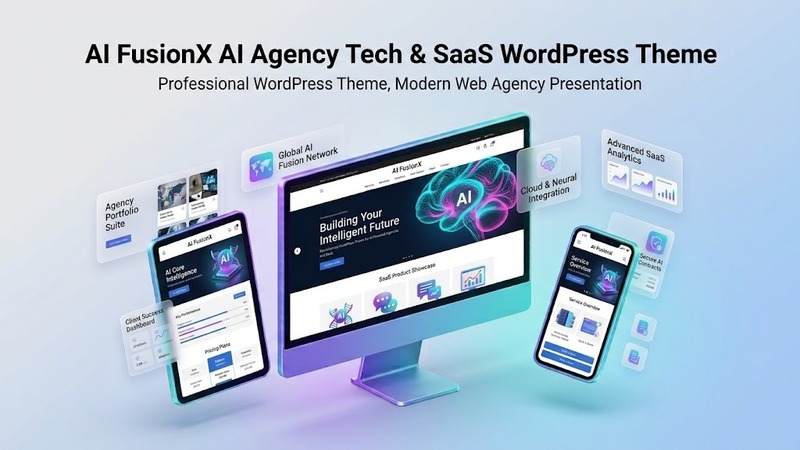
The design language leans heavily into dark-mode aesthetics, sharp geometric accents, and a color palette that skews toward deep navy, electric cyan, and clean white. It reads as "precision software company" rather than "flashy startup." For an AI consultancy, a micro-SaaS product page, or an agency selling workflow-automation retainers, that visual tone does a lot of heavy lifting for credibility. You walk into a sales call or drop the site link in a proposal, and the prospect already assumes you know what you're doing.
The theme targets a fairly narrow but lucrative audience: AI content and marketing agencies, automation and integration studios, AI-powered SaaS tools (think smaller, niche products rather than enterprise platforms), and solo AI trainers or consultants building out a personal-brand site. If your business sits anywhere in that cluster, you'll find relevant demo layouts without having to strip back a tourism or restaurant template.
Design & Page Builder Workflow
Out of the box, AI FusionX ships with strong Elementor integration. Every demo I tested loaded through Elementor's edit canvas with layers pre-mapped, so you're not reconstructing complex section stacks from scratch. The global styles are set up for the dark aesthetic, typography hierarchy is locked to a clean sans-serif pairing, and the spacing tokens feel consistent across breakpoints. You can tweak the palette in one place (Theme Options > Global Colors) and propagate changes across all demo templates.
Gutenberg works fine too, but here's where I'd be upfront: if you build your pages primarily in Gutenberg, you lose access to several of the pre-made hero sections, pricing-table blocks, and testimonial carousels that the demos showcase. Those modules are built as Elementor widgets or Elementor Pro custom widgets. You can replicate them in Gutenberg with the block editor, but you're essentially rebuilding the layout by hand. For a project where speed matters—say, you need to launch a client's AI-SaaS landing page this week—Elementor is the faster path here.
The demo templates number around twelve, covering everything from a full agency site with case studies and a services grid to a stripped-down SaaS product page with a feature matrix, FAQ accordion, and a gated email-capture form. Importing a demo is standard one-click via the setup wizard, but I'd recommend importing one or two rather than all of them. Loading the full library bloats your revisions table and makes the media library noisy. Pick the closest match to your layout, then iterate.
Header and footer builders are fully custom—drag-and-drop in Elementor. The sticky-header behavior on scroll works well, and there's a dedicated "header style" selector for desktop vs. mobile breakpoints so you can swap in a hamburger menu on smaller screens without touching your desktop layout.
Practical Functionality
A few things I specifically tested beyond the surface demo:
The WooCommerce layer is functional but minimal. I set up a four-product test store (digital download type) and the product cards, cart, and checkout pages inherit the theme's styling without needing extra CSS overrides. It's clean. There's no built-in subscription plugin integration or complex product-variation UI, though, so if your SaaS requires recurring billing or tiered access gating, you'll be layering in a plugin like MemberPress or Paid Memberships Pro on top. The theme won't fight those, but it won't hand you a ready-made "subscription dashboard" either.
Multi-language support works through standard WPML or Polylang installation. I ran a quick two-language test (English/Spanish) on the agency demo and the translations mapped to the right slots. No layout breaks. The caveat: the Elementor-specific widgets in the demos need to be flagged as translatable in WPML's string translation settings, otherwise you'll get mixed-language sections on some inner pages. It's a ten-minute fix, but you should budget for it.
Responsive performance is where I was pleasantly surprised. The mobile layout isn't just a squished desktop view. The nav collapses properly, the hero sections re-stack with readable font sizes, and the card-based service grids shift to a single-column feed. Page-speed-wise on my hosting setup (a mid-tier VPS, no caching plugin yet), initial page loads on the agency demo hovered around 1.8s on a throttled 4G profile. Not blistering, but well within acceptable range for a content-heavy marketing site. Add WP Rocket or LiteSpeed Cache and you'll likely push sub-second LCP.
The theme also includes a built-in "client marquee" slider for logo strips, a blog layout with two sidebar configurations, and a team/portfolio grid that auto-populates from a custom post type. For an AI consulting practice where you want to showcase past engagements or publish thought-leadership articles without switching themes, that's genuinely useful.
Technical Specifications
| Item | Detail |
|---|---|
| PHP Version | 7.4+ (tested on 8.1 and 8.2) |
| WordPress Compatibility | 6.0 through latest (6.4+) |
| Page Builders | Elementor (free & Pro), Gutenberg (core blocks) |
| Bundled / Required Plugins | Elementor (free), AIOSEO (free), WooCommerce (optional, for store demos) |
| Bundled Pre-Built Demos | ~12 one-click importable templates (agency, SaaS, consulting, portfolio, blog, 404, etc.) |
| Documentation | PDF + in-dashboard knowledge base; video walkthroughs on YouTube channel linked from the docs |
| License | Standard ThemeForest personal/commercial (unlimited projects under one purchase) |
| Update Cadence | Typically 2–3 minor updates per quarter post-purchase |
Final Takeaway
AI FusionX v10 is not going to be the "one theme for everything" workhorse. It's purpose-built, and that shows. If you're an agency owner or indie developer whose clients sit in the AI-adjacent space—automation workflows, AI SaaS, machine-learning consulting, prompt-engineering training—this saves you a week of designing a credible dark-tech layout from scratch. The Elementor demos are well-structured, the codebase is tidy, and the visual identity does the credibility work for you.
Where I'd hold back: if your project is a pure consumer SaaS with heavy interactive app-like features (dashboards, real-time data viz, embedded AI chat interfaces), you're better off building a React/Next.js front end and using WordPress only for CMS. This theme is a marketing-site and content-site theme at its core. Use it for the "face" of the business, not for the product interface itself.
For its target use case, it's a solid, no-fuss pick. Install it, grab the demo closest to your client's brand, spend a day swapping in copy and colors, and ship. That's the workflow it's designed for, and it delivers.